Paper Wallets vs Hardware Wallets: Which is Safer in 2026?
If you've been holding cryptocurrency for any length of time, you've likely heard the debate: is a paper wallet or a hardware wallet the safer option? In 2026, with cyber threats evolving and Canadian...
The Lifetimes Canada editorial team curates, fact-checks, and updates guides on personal finance, property, health, immigration, legal, business, and lifestyle topics relevant to Lifetimes Canada readers. Articles are produced with AI assistance and reviewed by the editorial team before publication.
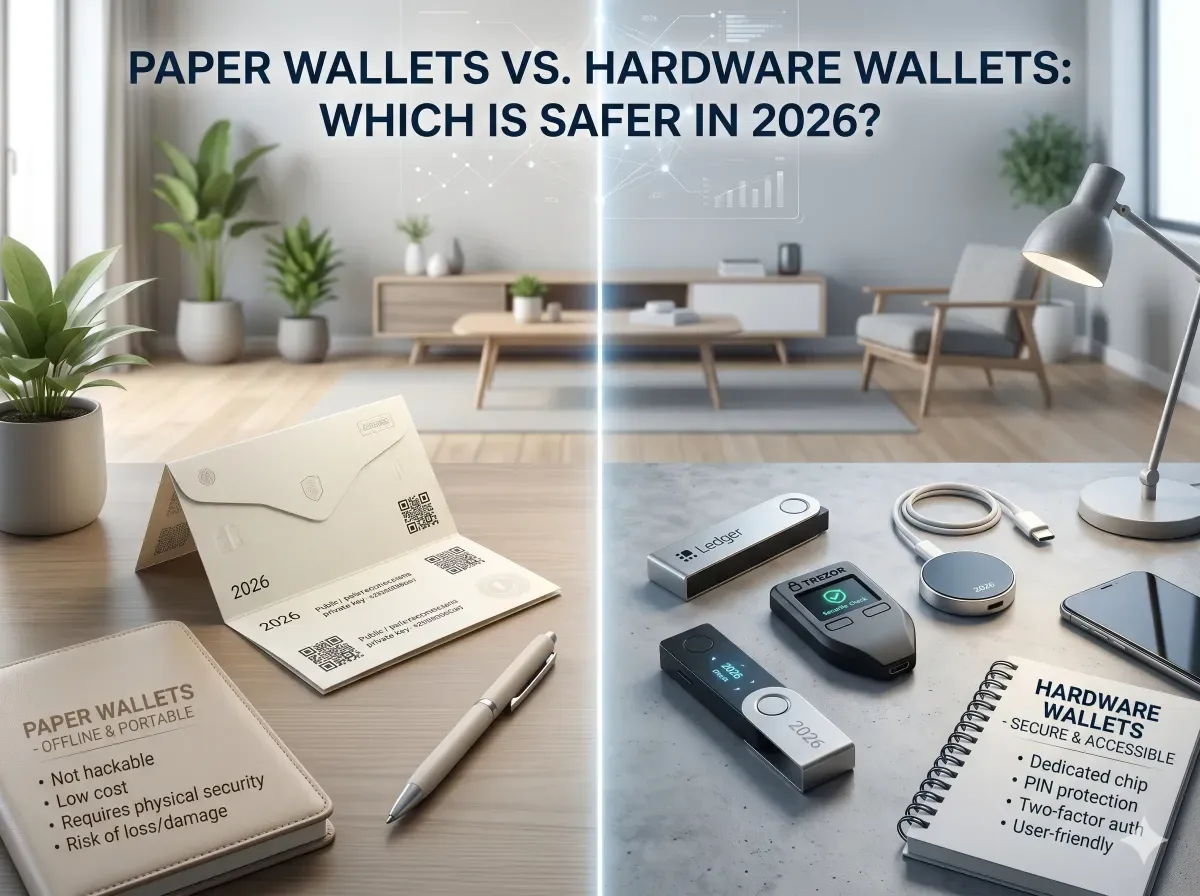
If you've been holding cryptocurrency for any length of time, you've likely heard the debate: is a paper wallet or a hardware wallet the safer option? In 2026, with cyber threats evolving and Canadian regulators taking a closer interest in digital asset custody, the answer isn't as simple as it used to be. We'll break down the real-world trade-offs, security considerations, and practical advice for Canadians looking to protect their crypto investments.
Understanding the Two Titans of Cold Storage
Before we compare, it's essential to understand what each option actually is. Both paper wallets and hardware wallets fall under the umbrella of "cold storage" — meaning your private keys are kept offline, away from internet-based threats like hackers or malware. However, they achieve this in fundamentally different ways.
What is a Paper Wallet?
A paper wallet is simply a physical document — usually a piece of paper — containing your public address (for receiving funds) and your private key (for spending them). You generate it using an offline tool, print it, and store it somewhere safe like a safety deposit box or a home safe. It's the original form of cold storage, championed for its simplicity and zero cost.
What is a Hardware Wallet?
A hardware wallet is a dedicated electronic device, roughly the size of a USB stick, designed specifically to store private keys. Brands like Ledger, Trezor, and Coldcard dominate the market. The device signs transactions offline, so your private key never touches an internet-connected computer. In 2026, many models also support Bluetooth, multi-signature setups, and even direct integration with Canadian crypto exchanges like Shakepay or Newton.
Security: The Core Comparison
When we ask "which is safer," we're really asking about the risk of your private keys being compromised. Let's examine the key vulnerabilities for each method.
Paper Wallet Vulnerabilities
Paper wallets are not without risk. The most common pitfalls include:
- Physical damage: Fire, water, or even a simple coffee spill can destroy your keys forever.
- Printing risks: If your printer has a memory buffer or is connected to the internet, your keys could be intercepted during the printing process.
- Human error: Generating a paper wallet on a compromised computer (e.g., one with malware) can expose your keys before they ever reach paper.
- Lack of redundancy: If you lose the single piece of paper, your funds are gone. There's no "reset" button.
- Inability to transact easily: To spend funds from a paper wallet, you must import the private key into a software wallet — a process that exposes it to an internet-connected environment, defeating the purpose of cold storage.
Hardware Wallet Vulnerabilities
Hardware wallets are generally considered more secure for active use, but they have their own weaknesses:
- Supply chain attacks: Buying a tampered device from a third-party seller (e.g., on Amazon or eBay) could compromise security. Always purchase directly from the manufacturer.
- Firmware bugs: While rare, vulnerabilities in the device's firmware can be exploited. Regular updates are critical.
- Physical theft: If someone steals your device, they could attempt to brute-force your PIN. However, most devices self-destruct after a set number of incorrect attempts.
- Cost: A good hardware wallet costs $50 to $200 CAD, which may be a barrier for smaller portfolios.
Practical Considerations for Canadians
Beyond raw security, there are factors unique to the Canadian context that should influence your choice.
Tax Reporting and CRA Compliance
The Canada Revenue Agency (CRA) treats cryptocurrency as a commodity, meaning any disposition — including spending, trading, or gifting crypto — is a taxable event [1]. If you use a paper wallet and later import the keys to a software wallet to make a transaction, you must track the cost basis and date of acquisition. Hardware wallets often integrate with portfolio trackers (like Koinly or CoinTracker) that help generate CRA-compliant reports, making tax season less painful.
Inheritance and Estate Planning
If you pass away, your heirs need access to your crypto. A paper wallet stored in a safety deposit box is straightforward — your executor can physically retrieve it. However, if the paper is damaged or the key is unreadable, the funds are lost. Hardware wallets offer a solution: you can set up a "recovery seed" (a 12- or 24-word phrase) and store that phrase separately. Your executor can use the seed to recover the funds on a new device, even if the original hardware wallet is destroyed.
Exchange Integration
Many Canadian exchanges now support direct transfers to hardware wallets. For example, Newton and Shakepay allow you to withdraw Bitcoin or Ethereum to a hardware wallet address with minimal fees [2]. Paper wallets, by contrast, require you to manually generate an address and then send funds — a process that's more error-prone and less user-friendly.
Which One is Safer in 2026?
The honest answer is: it depends on your threat model and technical comfort level. Here's a quick decision framework:
Choose a Paper Wallet If:
- You are a long-term "hodler" who never intends to transact with the funds.
- You want zero upfront cost and are comfortable with offline generation (e.g., using a live Linux USB on an air-gapped computer).
- You have a very small portfolio (under $1,000 CAD) and are okay with the risk of physical loss.
- You want a simple backup that doesn't rely on electronics or batteries.
Choose a Hardware Wallet If:
- You plan to transact, trade, or stake your crypto periodically.
- You want robust protection against malware and phishing attacks.
- You have a portfolio exceeding $1,000 CAD and want professional-grade security.
- You value the ability to recover your funds via a seed phrase if the device is lost or destroyed.
- You want seamless integration with tax reporting tools for CRA compliance.
Best Practices for Either Method
No matter which route you choose, follow these universal security principles:
- Never share your private key or seed phrase with anyone. Not even "support" staff from exchanges or wallet providers.
- Use multi-signature setups for large amounts. This requires multiple private keys to authorize a transaction, adding a layer of security.
- Store backups in separate physical locations. For example, one copy in a home safe and another in a bank safety deposit box.
- Test your setup. Send a small amount (e.g., $10 CAD) to your wallet first, then try to recover it to ensure everything works before depositing larger sums.
- Keep firmware and software up to date. Hardware wallets require periodic updates to patch vulnerabilities.
Conclusion: Making the Right Choice for Your Needs
In 2026, the debate between paper wallets and hardware wallets isn't about which is universally "safer" — it's about which aligns with your specific needs as a Canadian crypto holder. For most of us, a hardware wallet offers the best balance of security, usability, and tax compliance. It protects against the most common threats (malware, phishing, physical theft) while allowing you to transact and report to the CRA with ease.
But if you're a true long-term hodler with a small portfolio and a high tolerance for technical complexity, a properly generated paper wallet can still serve as a reliable, zero-cost cold storage solution. Just remember: the weakest link is almost always human error, not the technology itself.
Whichever path you choose, start small, test your recovery process, and never let your guard down. Your future self — and your CRA auditor — will thank you.
Frequently Asked Questions
Sources & References
-
1
CRA Cryptocurrency Guide — canada.ca — www.canada.ca
-
2
Shakepay Withdrawal Guide — Shakepay Support — support.shakepay.com
-
3
Are Banks Blocking Crypto Purchases? — Ledger Academy — www.ledger.com
Related Articles
Best Seed Phrase Storage Options in 2026 (Metal Wallets Reviewed)
Imagine losing access to your cryptocurrency holdings because your seed phrase got wet, burned, or stolen—it's a nightmare no Canadian crypto holder wants to face. In 2026, with Bitcoin and Ethereum p...
Ledger Nano X vs Trezor Safe 3: Best Cold Wallet for Canadians in 2026
As Canadians dive deeper into cryptocurrency investments, choosing the right cold wallet is crucial for safeguarding assets against hacks and theft. The **Ledger Nano X** and **Trezor Safe 3** stand o...
How to Transfer Crypto from Wealthsimple to a Ledger Wallet
Ever bought crypto on Wealthsimple and wondered how to take full control by moving it to your own hardware wallet? Transferring your cryptocurrency from Wealthsimple to a Ledger wallet is a smart move...